IPv4 Subnet Calculator
Enter an IPv4 address and CIDR prefix to calculate the containing network, mask, address range and host count. This subnet calculator handles /31 point-to-point and /32 single-host cases explicitly. It performs local arithmetic only; it does not scan a network, find connected devices or verify which addresses are assigned.
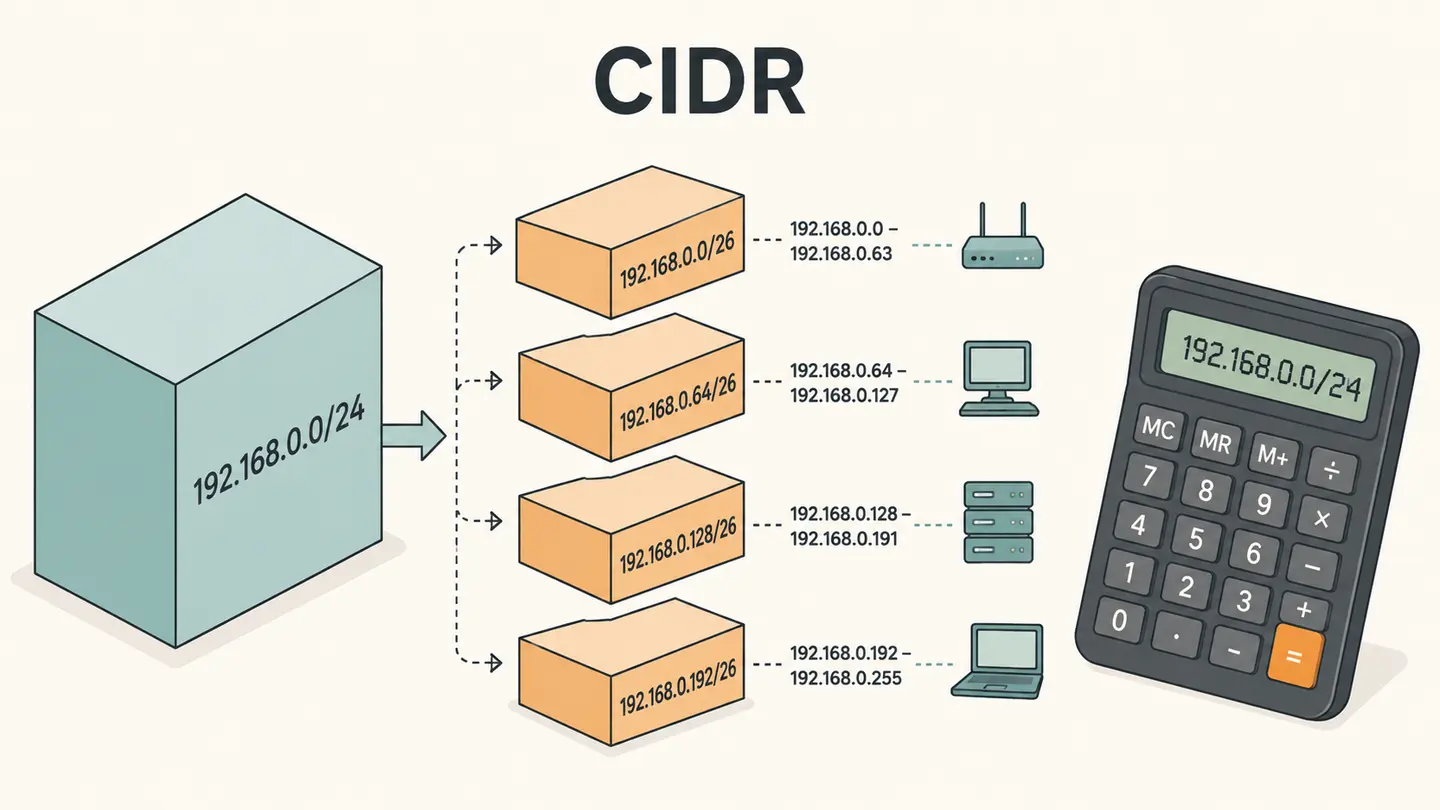
Enter an IPv4 address and CIDR prefix to calculate the containing network, mask, address range and host count. This subnet calculator handles /31 point-to-point and /32 single-host cases explicitly. It performs local arithmetic only; it does not scan a network, find connected devices or verify which addresses are assigned.
Local /0 through /32 calculation, with point-to-point /31 and single-host /32 conventions.
Best solution
Enter an IPv4 address and CIDR prefix to calculate the containing network, mask, address range and host count.
Local /0 through /32 calculation, with point-to-point /31 and single-host /32 conventions.
- Mask
- 255.255.255.0
- Range
- 192.168.1.1 – 192.168.1.254
- Broadcast
- 192.168.1.255
- Addresses
- 256 total · 254 usable
/31 uses the point-to-point convention; /32 is one host. No network scan is performed.

Opens the Kepo download page; this calculation or file is not transferred.
Key solutions at a glance The main decisions from this guide, condensed into one table.
How to Use This Check
Enter four decimal address components from zero through 255, separated by dots. Leading zeros are rejected to avoid ambiguous notation. The address can be any address inside the network you are describing; it does not have to be the network’s first address.
Enter a whole-number prefix from zero through 32. The prefix counts network bits. A larger prefix leaves fewer host bits and creates a smaller containing block. The subnet calculator shows the corresponding dotted-decimal mask so you can compare the two representations directly.
Read the network, last address, conventional usable range and count together. For prefixes through /30, the conventional subnet calculation excludes the network and directed-broadcast addresses from the host count. These are arithmetic conventions, not a discovery of which machines are online.
Check the /31 and /32 labels before copying. A /31 is treated as a point-to-point pair with two endpoint addresses and no directed broadcast. A /32 represents one host. Do not apply the familiar subtract-two formula blindly to these cases or use their special rules for a different deployment model.
What the Result Actually Means
An IPv4 address has 32 bits. If the network prefix is p, the containing block has 2 to the power of 32 minus p addresses. The subnet calculator locates the block containing the input address and derives the mask and boundaries from that size. For example, 192.168.1.42 with /24 belongs to 192.168.1.0/24. The conventional broadcast address is 192.168.1.255, with 254 conventional host addresses between the endpoints. This calculation does not know which addresses your DHCP server reserves or whether your equipment uses the same network configuration.
| Field or observation | Meaning |
|---|---|
| 192.168.1.42 /24 | 192.168.1.0/24; 254 conventional hosts |
| 10.0.0.1 /31 | 10.0.0.0–10.0.0.1; two point-to-point endpoints |
| 10.0.0.1 /32 | One host: 10.0.0.1 |
| 0.0.0.0 /0 | All 4,294,967,296 IPv4 addresses |
Limits and Common Misreadings
A subnet calculator cannot identify free addresses. An address inside the usable range may already be assigned, reserved or intentionally unused. Consult the network configuration you administer before assigning an address.
The /0 result is an arithmetic address-space range, not a suggestion that every address in it is publicly routable or available for allocation. Special-use ranges and routing policy are separate matters.
This component calculates IPv4 only. IPv6 subnet planning uses different address notation and operational conventions. It would be misleading to accept an IPv6 string and silently reinterpret it as an IPv4 result.
An Example of Careful Interpretation: Separate the Observation from Its Cause
For 192.168.1.42/24, the host portion has eight bits, giving 256 total addresses. Conventional subnet rules reserve the network and broadcast endpoints, leaving 254 host addresses. Changing the prefix to /25 leaves seven host bits and a block of 128 addresses. The same input address then belongs to the lower half of the former /24, with different boundaries. This shows why the prefix cannot be omitted: the address alone does not uniquely determine a subnet. Save the address and prefix together, and distinguish calculated capacity from actual address availability.
Keep a Useful Troubleshooting Record
Keep the question, input, observation time and source together. A bare address, percentage or status code is difficult to interpret later because it omits the connection and measurement context. When comparing two observations, note what changed between them: the target, network, VPN state, selected adapter, record type or remote origin. Change one relevant condition at a time when possible. That makes the comparison easier to explain without inventing a cause from one number.
Save only information you actually need. Network records can reveal infrastructure names and connection details, even when they do not contain a password. Remove unrelated identifiers before sharing a screenshot with another person. Never put private credentials in a domain field or publish an internal hostname as part of a public test. A copied result is a snapshot, not a promise that the same conditions still apply when someone reads it later.
Kepo is a Mac desktop-widget product for repeated checks and small workflows. A labeled troubleshooting note or a supported monitoring widget can keep the relevant context accessible while you work. The download link opens the product workflow; this article does not automatically install a configured diagnostic widget, transfer your network inputs or start a scheduled check. Confirm the actual widget’s capabilities before relying on it for ongoing observations.
Choose the next task by the question you need answered.
Frequently Asked Questions
Does ipv4 subnet calculator describe my entire network?
No. The steps and component above define the scope of this observation. A local adapter value, an external address and a remote probe result describe different viewpoints. Preserve that context and do not generalize a single observation to every application or connection.
What should I do when a result is unavailable?
Keep it marked unavailable. An unfinished or failed observation is not a successful zero result and does not establish the cause of a problem. Check the input and try again later only when another observation is useful. Respect provider limits rather than repeatedly retrying.
Does this page save a monitoring history or install a desktop widget?
No. The page provides the specific manual workflow described above. It does not schedule future tests or create a configured desktop widget. Save the relevant result yourself and use an explicitly supported monitoring feature if you need recurring checks.
Sources and Method
Primary references for the protocol, provider or operating-system steps.
A useful network answer states what was checked, where the observation came from and what remains unknown. Keep those distinctions when you save or share the result.
Stay informed with Kepo on your desktop
Embed interactive widgets, monitor dynamic sites, track APIs, and run ambient AI agents right on your macOS desktop.
Related Articles
View all posts →How to calculate days between dates and business days
Enter two dates to count calendar days, weekdays, and weekends. Check whether to include the end date, follow a worked example, and account separately for holidays.
90 days from today: calculate the exact date
Find the date 90 days from today with the calculator below. See a worked example, compare calendar days with weekdays, and understand why three months can give a different answer.
How to find IP address on Mac: local vs. public IP explained
Learn how to find IP address on Mac across local network interfaces and public gateways. Master Terminal shortcuts, understand private vs. public routing, and pin live network widgets to your desktop.
How to crop an image on Mac: native tools and instant workflows
Crop an image on Mac with Preview or Photos, or try the center-crop tool on this page. Compare selection controls, aspect ratios, PNG export, and ways to preserve the original.