What Is My IP Address?
Your public IP address is the address an internet service sees for the connection reaching it. Select Check connection to query the IPv4 endpoint below. A VPN, proxy or shared network can change the address that service sees. This is different from the private address shown in your computer’s network settings.
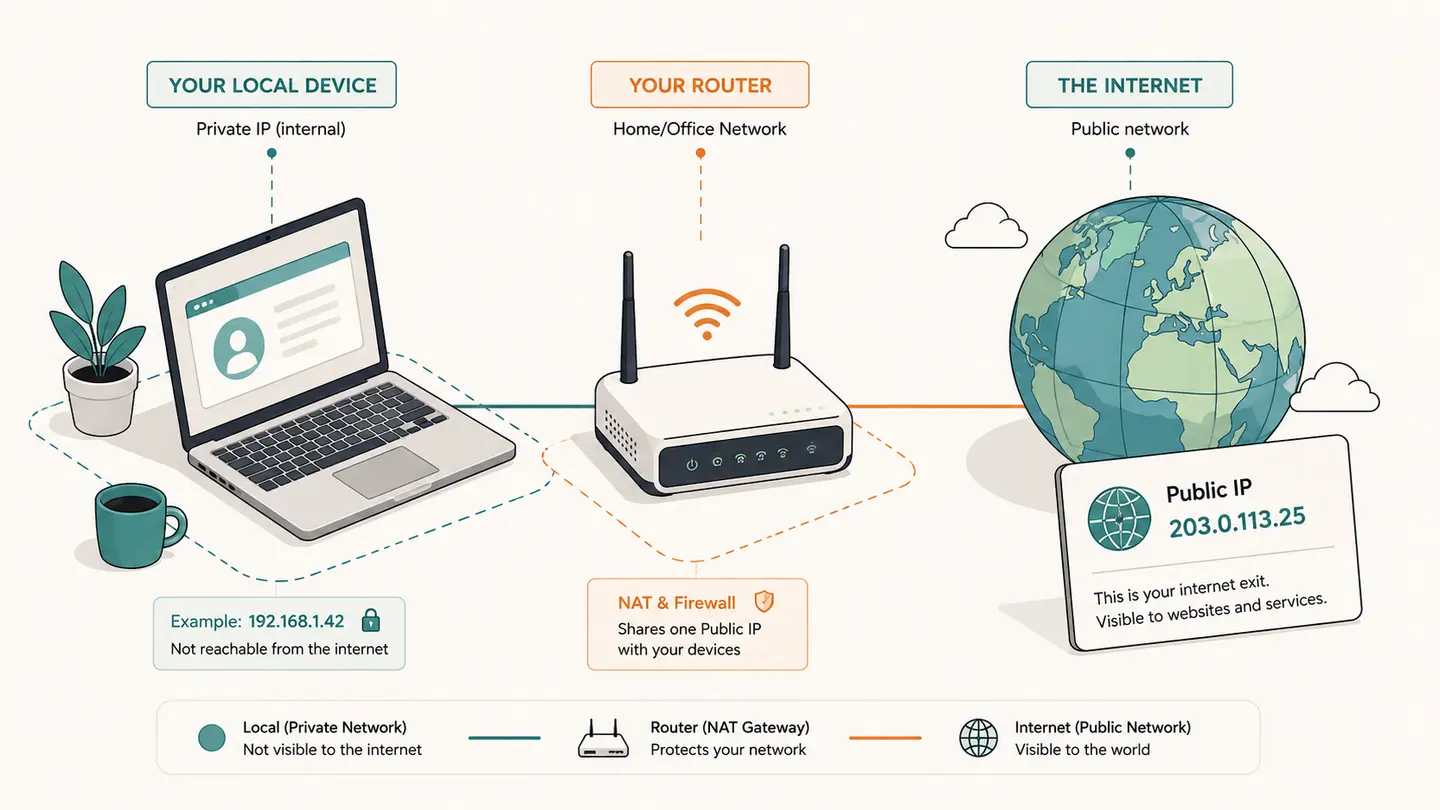
Your public IP address is the address an internet service sees for the connection reaching it. Select Check connection to query the IPv4 endpoint below. A VPN, proxy or shared network can change the address that service sees. This is different from the private address shown in your computer’s network settings.
A manual request to ipify. No local router discovery, location tracking or background refresh.
Best solution
Your public IP address is the address an internet service sees for the connection reaching it.
A manual request to ipify. No local router discovery, location tracking or background refresh.
Start a lookup to see the address visible to ipify.
A VPN, proxy or relay can change the observed address. HTTPS request time is not ICMP ping, packet loss or internet speed.
Clicking Check contacts ipify, which sees the request address. Results stay in this page. No automatic polling.

Opens the Kepo download page; this calculation or file is not transferred.
Key solutions at a glance The main decisions from this guide, condensed into one table.
How to Use This Check
Start with the network you actually want to check. If you are comparing home Wi-Fi, a wired connection and a VPN, change only one connection condition at a time. Close an old result before switching networks, then run a fresh check; an address captured earlier is a record of that earlier request, not a continuous indicator.
Select Check connection and wait for an address or an explicit failure. The tool sends a request to ipify’s IPv4 endpoint. It validates the returned address before displaying it and records the observation time. A blocked endpoint or timeout produces an unavailable result, not an invented address or a conclusion that the whole internet is offline.
Copy the result only when you need it for your own support or configuration task. The copied context includes the provider and time. Avoid posting a connection address in a public screenshot when it is not relevant. The address identifies an internet-facing network endpoint; by itself it does not establish a person, household or exact location.
To compare a VPN, run the same check before and after connecting, keeping the browser and endpoint constant. A changed public address is evidence that these requests used different exits. An unchanged address is not a complete VPN privacy assessment; split routing and application-specific proxies can affect other traffic differently.
What the Result Actually Means
A home router can translate traffic from several private devices onto one public IPv4 connection. A provider can add another shared translation layer. Consequently, two computers may report different private addresses but the same public address, while one computer can use different public exits for different routes. The what is my IP address question therefore needs a viewpoint: this tool answers what the selected external service observed. It cannot inspect the router’s administration interface, enumerate devices on Wi-Fi or read every network adapter from a normal browser page.
| Field or observation | Meaning |
|---|---|
| Public IPv4 | Observed by the external IPv4 service |
| Local IPv4 | Read from the selected operating-system adapter |
| Router address | Local gateway, not the internet exit |
| HTTP request time | Not ICMP ping or connection bandwidth |
Limits and Common Misreadings
A public IPv4 query does not test IPv6. Use the dedicated protocol check if the address family matters. Failure to reach a single IPv4 API may be caused by filtering, an extension, temporary provider trouble or connection settings; it is not sufficient evidence for a wider diagnosis.
Dynamic addresses can change. Save the timestamp and connection context rather than treating one result as a permanent identifier. For a support conversation, explain whether you were on a VPN or mobile hotspot without sharing unrelated personal account details.
The displayed request duration is an HTTP measurement to the address service. It includes browser and service behavior and must not be described as the latency of your game server, Wi-Fi radio or every internet destination.
An Example of Careful Interpretation: Separate the Observation from Its Cause
Suppose a laptop and phone on the same home Wi-Fi report the same public IPv4 address, while their local settings show different addresses. That is consistent with a shared internet exit and does not mean the two devices have been assigned the same local address. If the phone switches to cellular, a new external observation can change while the laptop’s observation remains the same. Record the connection transition rather than treating the old result as an error. This comparison answers a routing question; it does not identify all translation layers between either device and the service.
Keep a Useful Troubleshooting Record
Keep the question, input, observation time and source together. A bare address, percentage or status code is difficult to interpret later because it omits the connection and measurement context. When comparing two observations, note what changed between them: the target, network, VPN state, selected adapter, record type or remote origin. Change one relevant condition at a time when possible. That makes the comparison easier to explain without inventing a cause from one number.
Save only information you actually need. Network records can reveal infrastructure names and connection details, even when they do not contain a password. Remove unrelated identifiers before sharing a screenshot with another person. Never put private credentials in a domain field or publish an internal hostname as part of a public test. A copied result is a snapshot, not a promise that the same conditions still apply when someone reads it later.
Kepo is a Mac desktop-widget product for repeated checks and small workflows. A labeled troubleshooting note or a supported monitoring widget can keep the relevant context accessible while you work. The download link opens the product workflow; this article does not automatically install a configured diagnostic widget, transfer your network inputs or start a scheduled check. Confirm the actual widget’s capabilities before relying on it for ongoing observations.
Choose the next task by the question you need answered.
Frequently Asked Questions
Does what is my ip address? describe my entire network?
No. The steps and component above define the scope of this observation. A local adapter value, an external address and a remote probe result describe different viewpoints. Preserve that context and do not generalize a single observation to every application or connection.
What should I do when a result is unavailable?
Keep it marked unavailable. An unfinished or failed observation is not a successful zero result and does not establish the cause of a problem. Check the input and try again later only when another observation is useful. Respect provider limits rather than repeatedly retrying.
Does this page save a monitoring history or install a desktop widget?
No. The page provides the specific manual workflow described above. It does not schedule future tests or create a configured desktop widget. Save the relevant result yourself and use an explicitly supported monitoring feature if you need recurring checks.
Sources and Method
Primary references for the protocol, provider or operating-system steps.
A useful network answer states what was checked, where the observation came from and what remains unknown. Keep those distinctions when you save or share the result.
Stay informed with Kepo on your desktop
Embed interactive widgets, monitor dynamic sites, track APIs, and run ambient AI agents right on your macOS desktop.
Related Articles
View all posts →How to find IP address on Mac: local vs. public IP explained
Learn how to find IP address on Mac across local network interfaces and public gateways. Master Terminal shortcuts, understand private vs. public routing, and pin live network widgets to your desktop.
What Is My IPv6 Address?
Use a request to an IPv6-only address service to see the IPv6 address that service observes for your connection. Select Check connection below. If the request fails, the address is unavailable for this test; that alone cannot identify whether the cause is your ISP, routing, a browser extension or the service.
IPv6 Test: Check Both Address Families
Run separate requests to IPv4-only and IPv6-only endpoints and compare the observed outcomes. This IPv6 test can show whether this browser reaches those two services now. It is not a full protocol certification, DNSSEC assessment, router audit or guarantee of connectivity to every IPv6 destination.
How to calculate days between dates and business days
Enter two dates to count calendar days, weekdays, and weekends. Check whether to include the end date, follow a worked example, and account separately for holidays.